

Design Overview
Our design explorations and prototypes that we conducted as part of our research. We discuss how we framed the design problem and document the various approaches through which we attempted to solve the problem.

Referencing Cells
Referencing cells is one of the core actions in a spreadsheet app, and it was one of the first things we considered when designing Bean. Most of the actions in a spreadsheet make use of some kind of references to different areas within the spreadsheet, and making this action easier could help reduce friction from the user's workflow. Referencing cells is now primarily done using a verb-noun paradigm, to use Jef Raskin's terminology. Here, we tried to flip that order to create a noun-verb paradigm, which is arguably friendlier and natural for a beginner user.
Referencing a Single Cell
In a verb-noun approach, which is the default in spreadsheet apps right now, the user selects the action (verb) first, that is referencing the cell by typing an '=' symbol and moving into a reference/formula mode and then selects the cell (noun) that needs to be referred.
In contrast, in a noun-verb paradigm, the order is flipped. In the solution we went for, the user selects the data (noun) first, that is, the cell that you need referred to and drags it to the target cell. There is no 'reference mode'. Instead of shifting attention from the data to the target cell and then returning to the data that needs to be linked, this allows the user a natural way to link a cell to its target cell with at least one less attention shift. This makes it natural to the way a beginner user might think and help reduce errors the modes might bring in, as Raskin argues in his book, The Humane Interface.
Referencing Multiple Cells
Extending the idea further, here we look at referencing multiple cells. The same drag-and-drop interaction is used to reference multiple cells. Additionally, upon dropping the selected cells on the target cell, the user is presented with a list of commonly used functions based on the data types the cells hold. Here, three numeric cells are referenced, so a list of common numeric functions is provided to quickly complete the reference action.
Again, in the verb-noun construction we see in apps today, the user has to shift the focus from the data to go into a 'formula mode', typing an '=', then type in the function to come back to select the cells that were in the locus of their attention before they did all these actions. The noun-verb construction naturally maps to how most users intuitively think about approaching the task and reduces the surface area for errors by eliminating the mode.

Ways to Look Up Data
Nilenso suggested us explore a few tricky cases at the onset of the project and one of them was cross table lookups. There are multiple ways to to do lookups on spreadsheets, but most of them have a learning curve that involves the formula language and additionaly, the lack of a table schema also makes it hard for a novice user to wrap their head around most of the current solutions. Let's take a look at some of them:
INDEX and MATCH
This solution uses two functions INDEX and MATCH. MATCH function finds a given value from a given range and returns the position which INDEX uses as argument to lookup the desired value.
VLOOKUP
VLOOKUP is more straightforward since it's tailor-made for our task here. It takes three arguments, first the value you want to find, second, the range of cells in which to search for the value you want to find and a third argument for the column index that contains the value that you are trying to find in the range of cells.
Relation column
Some apps have built-in methods like relation columns that can be used to do relations like lookups.
We explored two interface solutions to make lookup natural and friendlier. One of allows relational database operations.

Cursor Instructions
As we saw in the solutions above, the formula language can be tricky to manipulate. The details of the function provided for help in the popover reads like a technical documentation that is meant for software developers than normal users.
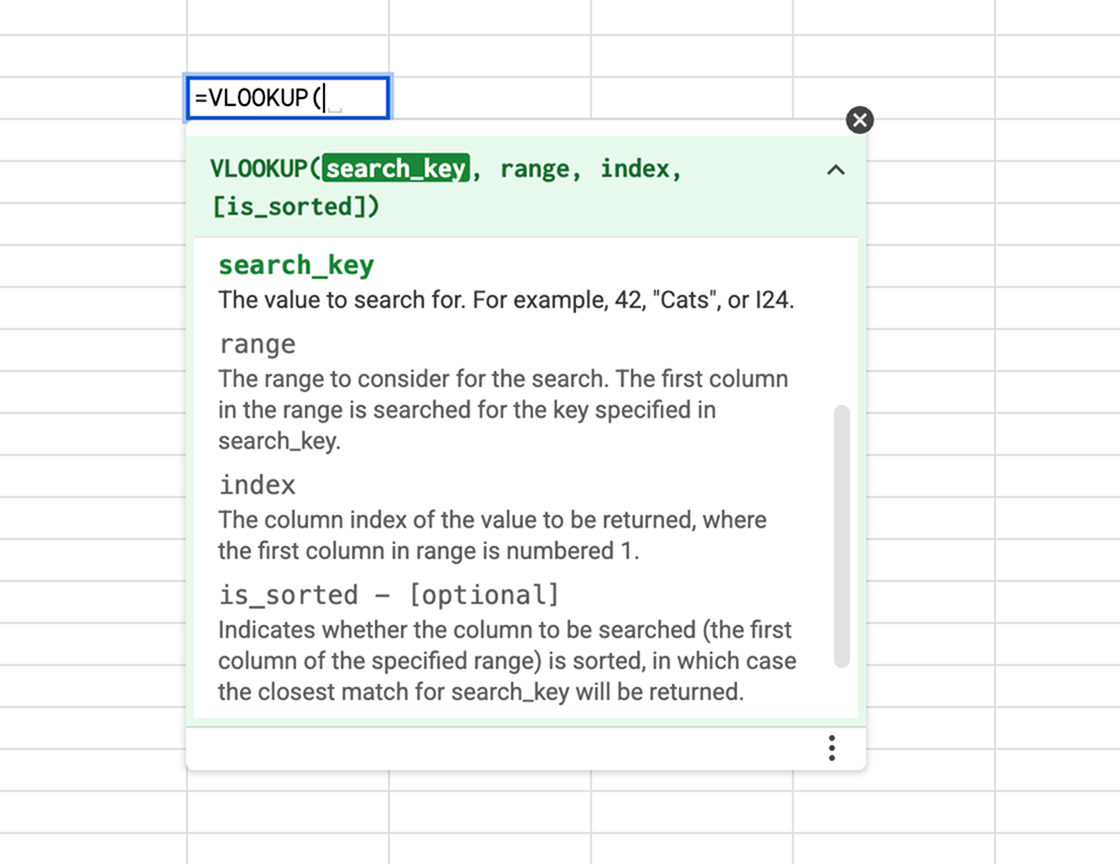
The solution we devised is a more general approach that applies to most spreadsheet functions, not just lookups. It provides contextual, onscreen instructions based on the function the user is providing arguments for, and is evaluated live for tight feedback loops. This augments the direct-manipulation interface, spreadsheets already have for providing arguments with a more friendlier step-by-step function documentation that helps users make sense of the function by directly interacting with the data.
We also explored a way to apply functions and formulas in a modeless way by creating smart suggestions based on user selections. Instead of going into a mode to type in the function then select the data, the user can select all the data involved in the function first and then complete the action with a given list of functions that fits the data they selected.
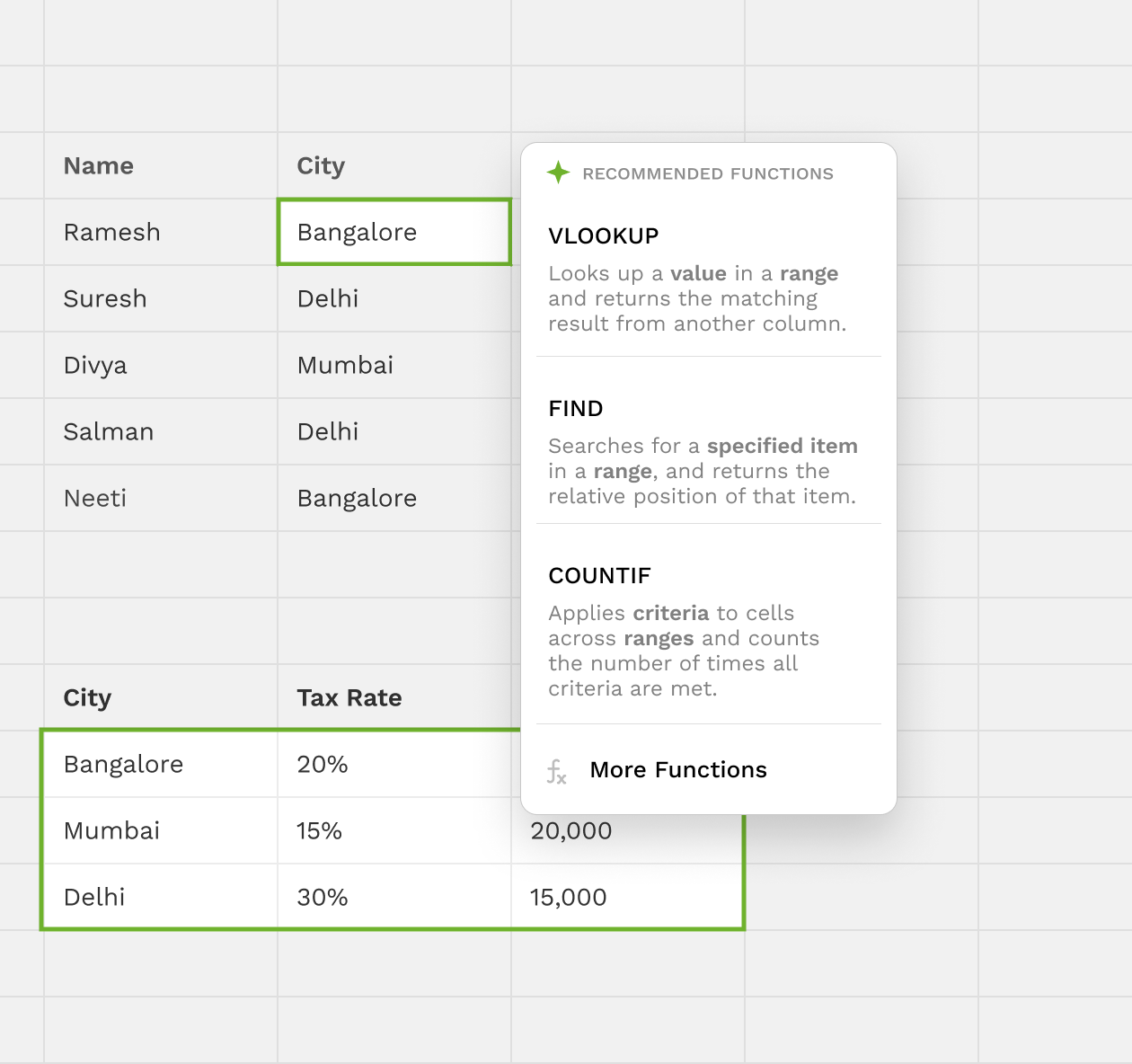

Table Joins
The second solution is a natural extension of the collection/table primitive Nilenso suggested as a core feature of Bean from the get-go. It brings in relational operations to the spreadsheet by introducing a table primitive. With the new table primitive in place, a user can use the natural join operation to create an equivalent output as that of the lookup.

Structured Data
The primary focus of our exploration for Bean with Nilenso was to come up with a set of higher-level structures to deal with collections of data within Spreadsheets. Preferably, we wanted the primitives to not hinder the user to format their data in whatever richness they seem fit for their analysis even with the new structures in place. There are very few collection primitives in spreadsheet apps today that keeps the freeform aspect intact. We wanted to bring in a new set of core primitives into spreadsheets that could handle the variety of organization that exists in structuring data in spreadsheets.
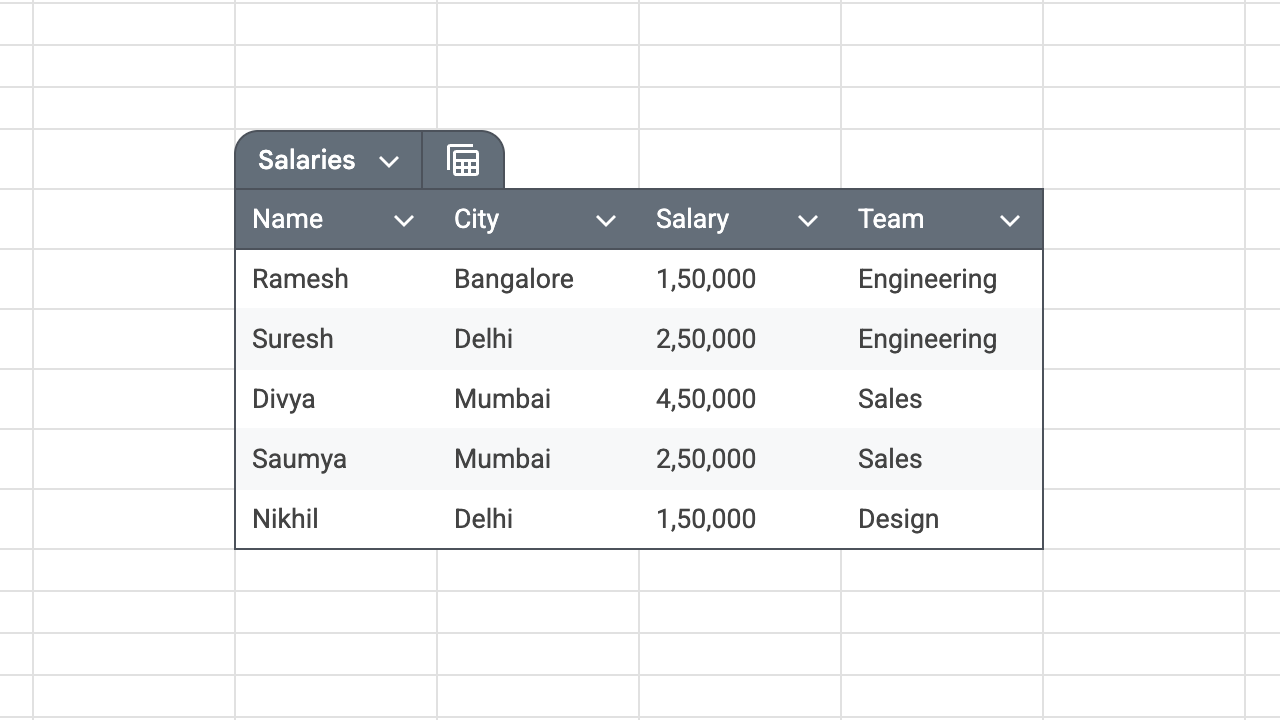
Spreadsheet apps today have a table primitive but it imposes constraints on the users to only use column labels. To figure out the variety in organization, we sifted through numerous spreadsheets and did a structural study to create a corpus of both the common and atypical cases that might popup while organizing data within spreadsheets.
Some of the common patterns we found out users naturally use in spreadsheets are as follows:
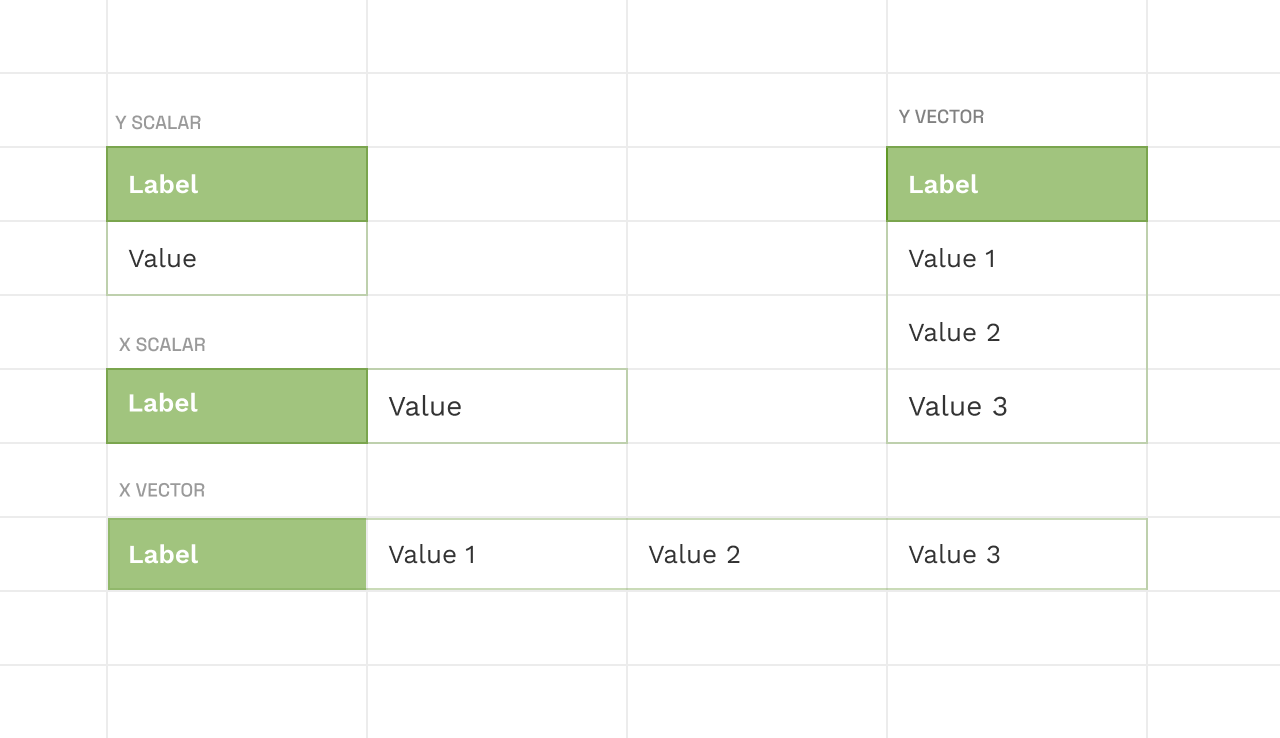
Scalars and Vectors
These are some of the simplest representations that can be done within spreadsheets, labelled point values or one-dimensional arrays are used for general sensemaking or to work with functions.
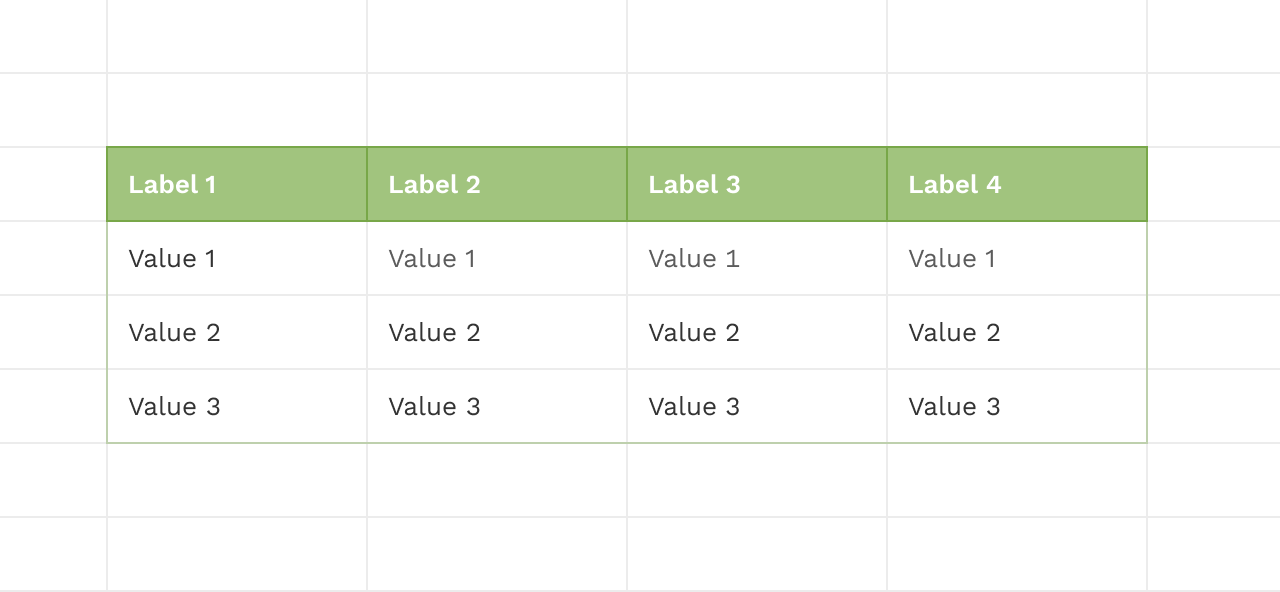
Tables with Column Headers
This is the most common way of representing tables that exist in spreadsheet apps today.
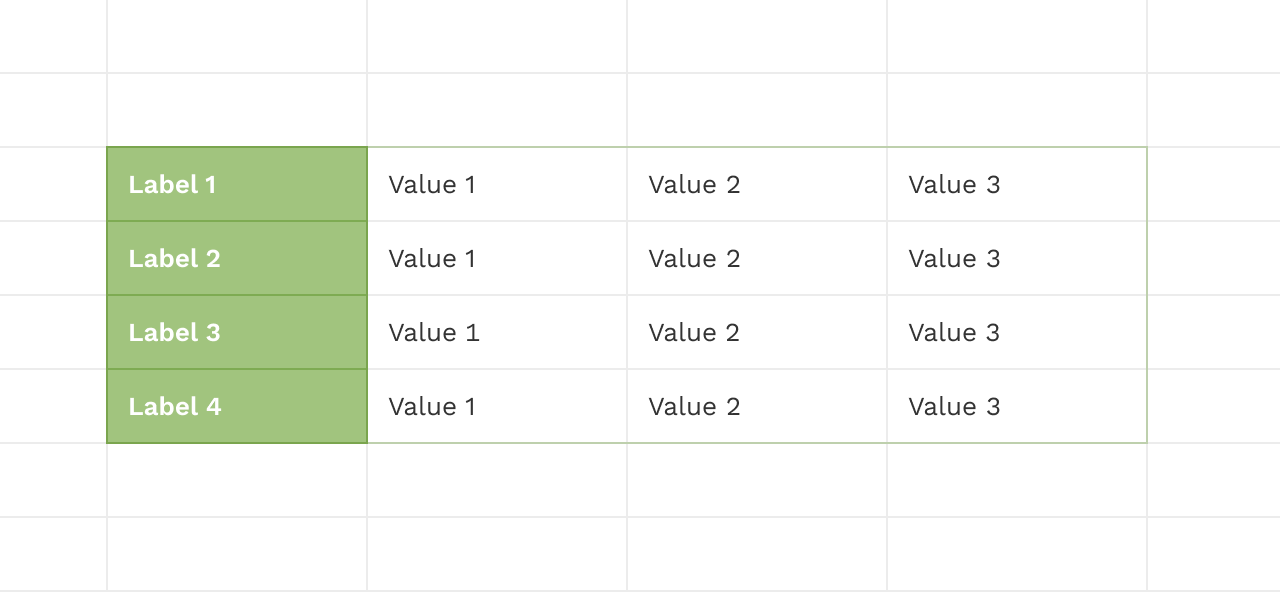
Tables with Row Headers
It's also natural to organize a table with row headers but most of the spreadsheet apps today force the user to pivot it to play along with the built-in table structures.
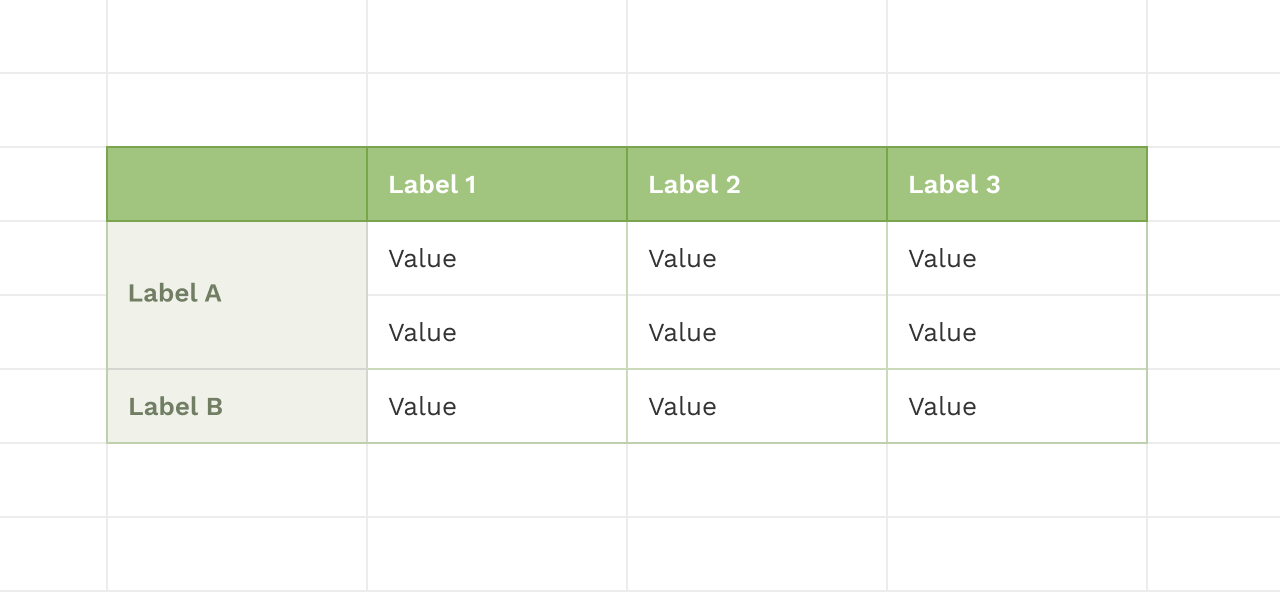
Cross Tabulation
These tables are great for sense making when you need to cross analyse data among different variables and it's use is commonplace.
Nested Tables
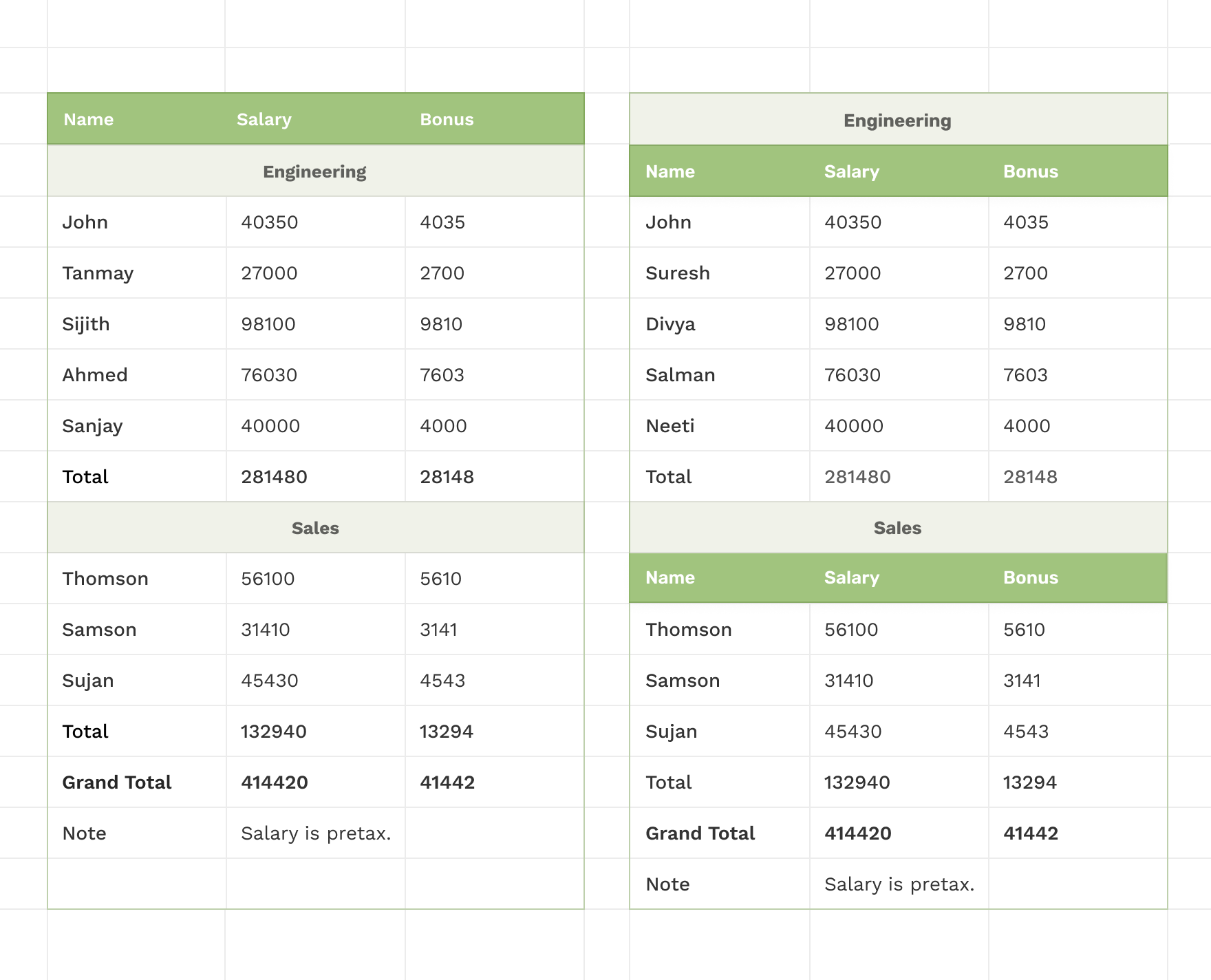
Here we look at cases that are a bit more involved where labels relate to each other in different ways. It is intuitive for users to merge cells and create labels that span multiple cells to create nested tables. Here is a table that emerges naturally when nested labels are used along both the dimensions creating heirarchies that structure the data.
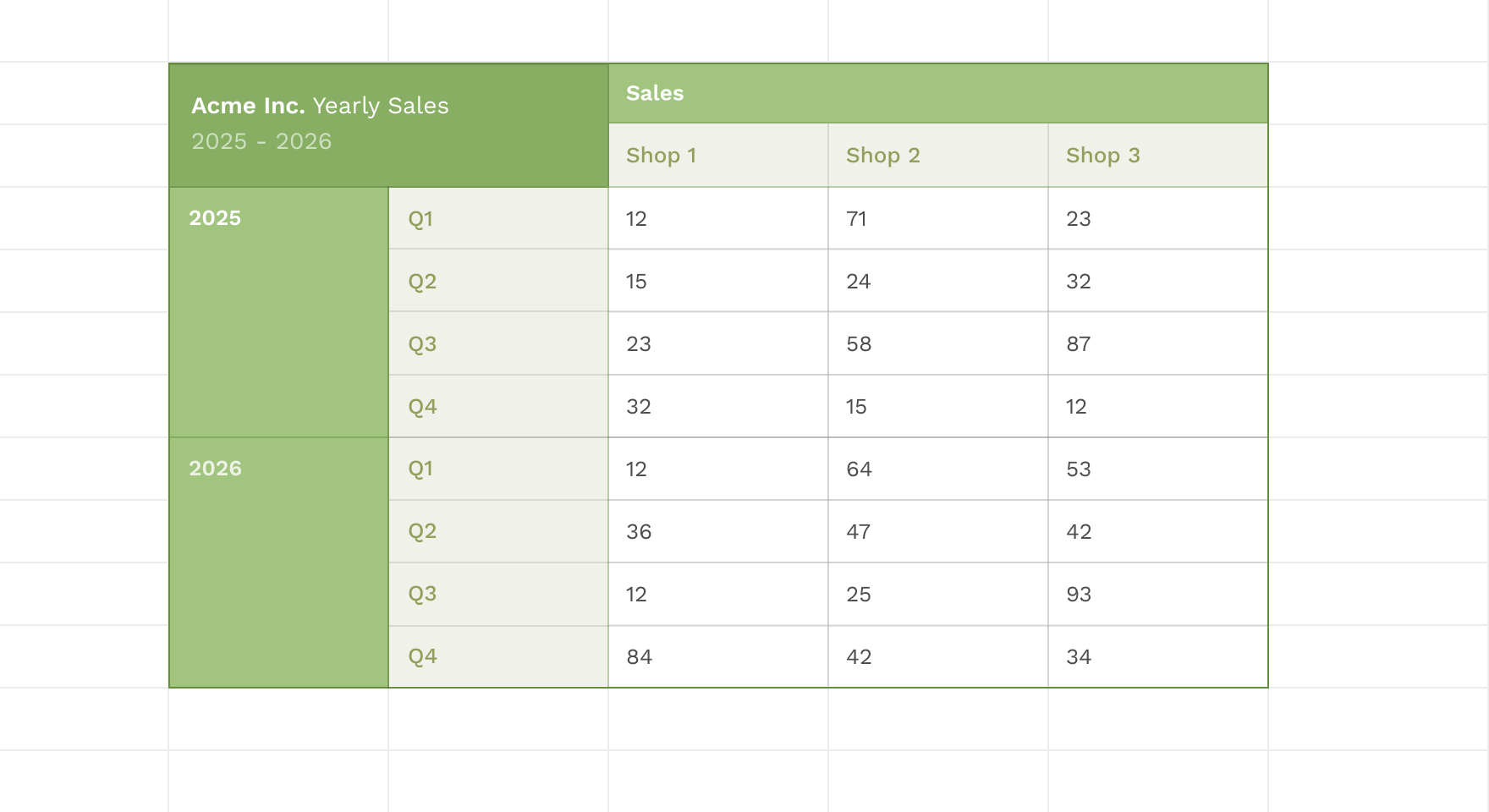
Interestingly enough we found cases where they do not use the wider label to be on top of the narrower labels, we wanted our model to capture intricacies like these as well.

Bean Model
The model we came up with captures a good chunk of the tables we analysed. It requires a demarcation process to separate out the labels from the data and a query language provides access to the structured data. We will look at both of these processes respectively next.
Demarcation Process
The user marks up the labels as top or left labels based on the intended semantics, the model uses a linear bounding box matching the span and direction of the label and extends it til the end of the frame. A skip label is used to pop cells out of this selections made with the top and left labels.
Querying
The query language can zero-in on any specific intersection of the data that's accesible through the labels. This enables the user to apply filters, aggregations, or any other compatible function over this selection swiftly and further add more data without breaking the bounds.
Contexts
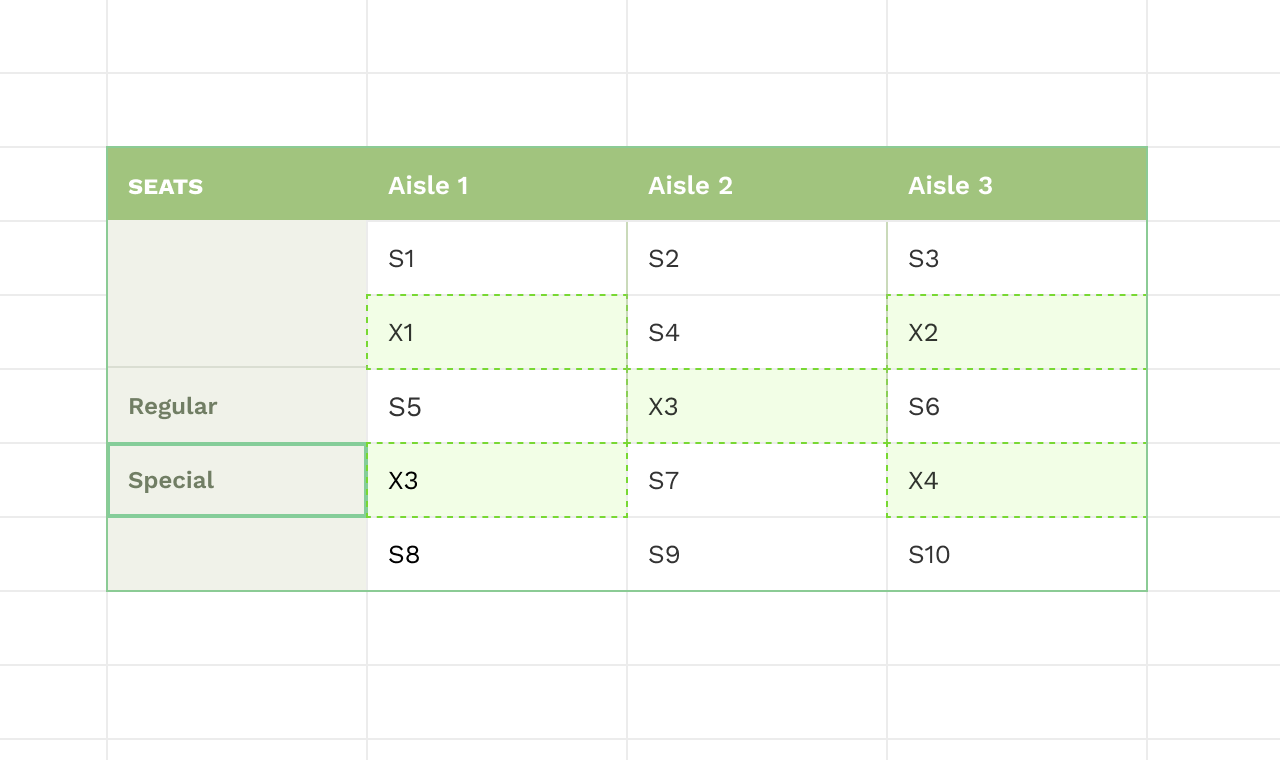
The Bean model captures a large chunk of the tables in the wild, but it still fall short in irregular cases where the labels are not linear. So we cursorily explored a potential solution that could label arbitrary cells but it remains as an open ended solution that anyone interested in the space can potentially explore further.
The table model we discussed above opens up the space for direct manipulation interfaces over structured data. Let's look at some of these next.

Computed Columns
Users can use direct manipulation to create computed columns/rows by dragging cells that are under marked labels to a new cell adjacent to the table. Further, to aggregate a specific row or column the user can drag the label which locates the data into the target cell. The user can then do a sum or run other aggregate functions that uses this collection of cells. What would have otherwise taken a lot of keyboard input is here transformed into gestures that are natural and modeless with the introduction of the table structure and the drag-and-drop interface.

Direct Queries
As an easier alternate to typing in the queries that zero-in on a structured area, the user can also just select the content directly or just select the labels that needs to be intersected and drag them into the new area to create a reference. The queries will be generated behind the scenes based on the selections made on the spreadsheet canvas.